> ## Documentation Index
> Fetch the complete documentation index at: https://docs.anymorph.ai/llms.txt
> Use this file to discover all available pages before exploring further.
# General
> Set the dashboard theme and your email notifications, and leave or delete the workspace.
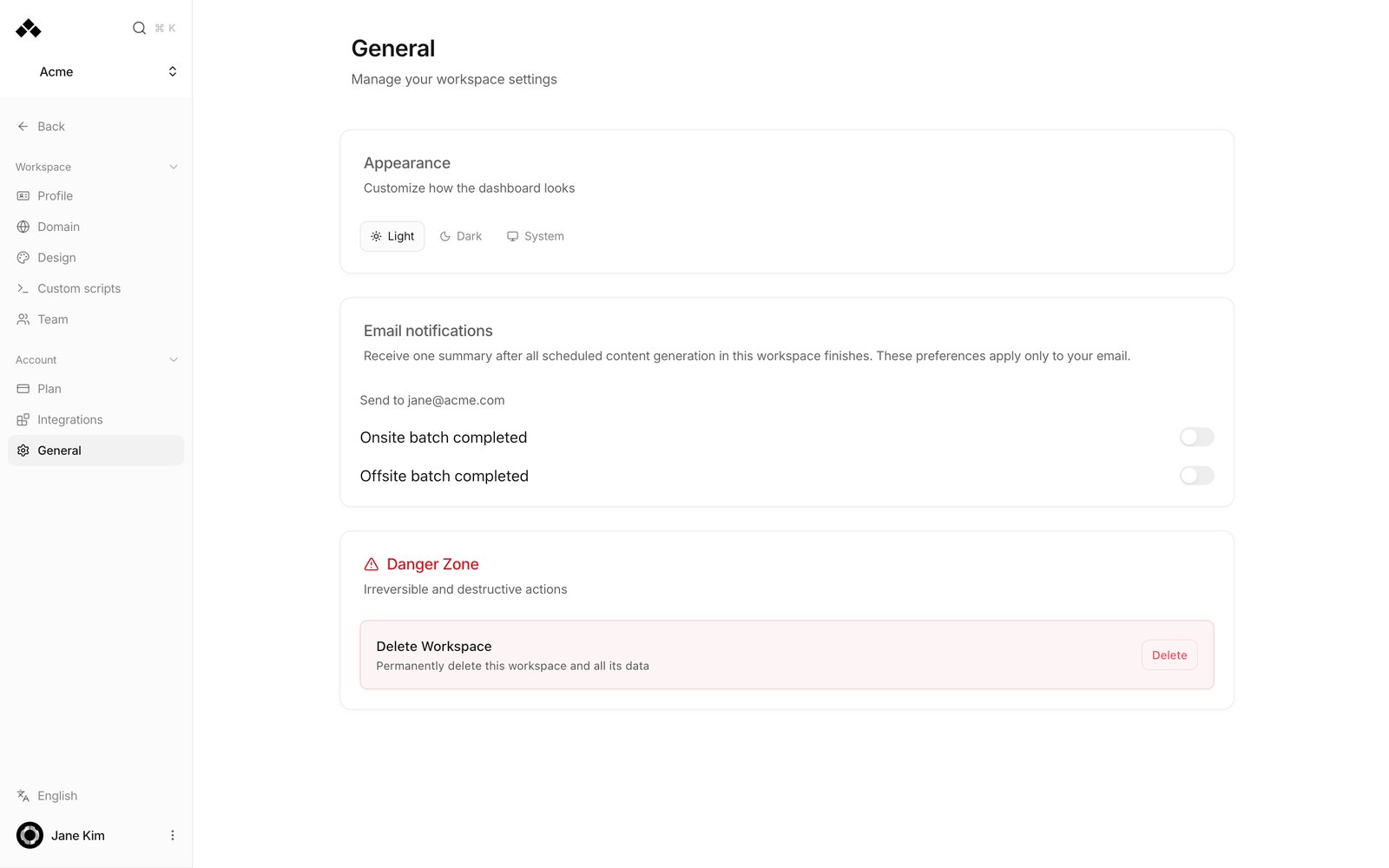
**General** controls how the dashboard looks to you and which summary emails you get, and holds the actions for leaving or deleting the workspace.
 ## Getting around Settings
Open **Settings** in the left sidebar and the navigation switches to two groups. **Workspace** holds Profile, Domain, Design, Custom scripts and Team — everything that describes this brand and its pages. **Account** holds Plan, Integrations and General, which cover your subscription, connected services and your own dashboard preferences. **Back** at the top returns you to the dashboard.
## What's on the screen
| Card | What it does | Where it takes effect |
| ----------------------- | -------------------------------------------------------------------------------- | -------------------------------------------- |
| **Appearance** | Choose **Light**, **Dark** or **System**. **System** follows your device setting | The whole dashboard |
| **Email notifications** | Two switches: **Onsite batch completed** and **Offsite batch completed** | Only your own email, shown after **Send to** |
| **Danger Zone** | Irreversible actions | Access to the workspace |
**Email notifications** sends you one summary after all scheduled content generation in this workspace finishes, once for on-site pages and once for off-site articles, according to the switches. Each change confirms with "Notification preferences saved". If the card can't load, press **Retry**.
The display language is no longer on this screen. Click the language row at the bottom of the left sidebar (it reads **English** or **한국어**) to switch; it applies to your account only. The language your pages are written in comes from **Primary Language** on [Profile](/settings/profile).
## Danger Zone
What you see depends on your role.
### Leave Workspace (members)
Shown to members who are not admins. **Leave** asks "Leave \[workspace]?" and, once confirmed, ends your access. You need a new invitation to rejoin. The last remaining admin cannot leave.
### Delete Workspace (admins)
Shown to admins. It permanently removes the workspace and everything in it.
Deletion removes all pages and analytics and cannot be undone. You must type **delete** in the confirmation before the **Delete workspace** button becomes active.
## How to use it
Pick **Light**, **Dark** or **System** under **Appearance**. It applies immediately.
Under **Email notifications**, turn on **Onsite batch completed** and/or **Offsite batch completed**. They go to the address after **Send to**.
**Danger Zone** → **Leave** → confirm. If you are an admin, promote someone else first.
## FAQ
To the bottom of the left sidebar. Click the row that reads **English** or **한국어** and the dashboard switches; it confirms with "Display language updated" and applies to your account only.
No. The switches here are for your own address only. Each member sets their own.
No. That comes from **Primary Language** on Profile.
Only admins do. Members see **Leave Workspace** instead.
No. Pages and analytics are permanently removed.
Promote someone to Admin on [Team](/settings/team) first.
## Related
Manage members and roles.
Subscription and limits.
Brand information and default language.
A quick pass over every screen.
## Getting around Settings
Open **Settings** in the left sidebar and the navigation switches to two groups. **Workspace** holds Profile, Domain, Design, Custom scripts and Team — everything that describes this brand and its pages. **Account** holds Plan, Integrations and General, which cover your subscription, connected services and your own dashboard preferences. **Back** at the top returns you to the dashboard.
## What's on the screen
| Card | What it does | Where it takes effect |
| ----------------------- | -------------------------------------------------------------------------------- | -------------------------------------------- |
| **Appearance** | Choose **Light**, **Dark** or **System**. **System** follows your device setting | The whole dashboard |
| **Email notifications** | Two switches: **Onsite batch completed** and **Offsite batch completed** | Only your own email, shown after **Send to** |
| **Danger Zone** | Irreversible actions | Access to the workspace |
**Email notifications** sends you one summary after all scheduled content generation in this workspace finishes, once for on-site pages and once for off-site articles, according to the switches. Each change confirms with "Notification preferences saved". If the card can't load, press **Retry**.
The display language is no longer on this screen. Click the language row at the bottom of the left sidebar (it reads **English** or **한국어**) to switch; it applies to your account only. The language your pages are written in comes from **Primary Language** on [Profile](/settings/profile).
## Danger Zone
What you see depends on your role.
### Leave Workspace (members)
Shown to members who are not admins. **Leave** asks "Leave \[workspace]?" and, once confirmed, ends your access. You need a new invitation to rejoin. The last remaining admin cannot leave.
### Delete Workspace (admins)
Shown to admins. It permanently removes the workspace and everything in it.
Deletion removes all pages and analytics and cannot be undone. You must type **delete** in the confirmation before the **Delete workspace** button becomes active.
## How to use it
Pick **Light**, **Dark** or **System** under **Appearance**. It applies immediately.
Under **Email notifications**, turn on **Onsite batch completed** and/or **Offsite batch completed**. They go to the address after **Send to**.
**Danger Zone** → **Leave** → confirm. If you are an admin, promote someone else first.
## FAQ
To the bottom of the left sidebar. Click the row that reads **English** or **한국어** and the dashboard switches; it confirms with "Display language updated" and applies to your account only.
No. The switches here are for your own address only. Each member sets their own.
No. That comes from **Primary Language** on Profile.
Only admins do. Members see **Leave Workspace** instead.
No. Pages and analytics are permanently removed.
Promote someone to Admin on [Team](/settings/team) first.
## Related
Manage members and roles.
Subscription and limits.
Brand information and default language.
A quick pass over every screen.