> ## Documentation Index
> Fetch the complete documentation index at: https://docs.anymorph.ai/llms.txt
> Use this file to discover all available pages before exploring further.
# Welcome to Anymorph
> Measure how AI engines talk about your brand, create content they can cite, then see what it returned
Anymorph measures how AI engines like ChatGPT, Perplexity, Gemini and Google AI answer questions in your category, creates content those engines can cite — on your own domain (on-site) and on external publications (off-site) — and then shows you what that content actually returned. It exists because customers increasingly ask an assistant instead of typing into a search box, and "does AI mention us?" needs to be a number you manage, not a feeling.
## How it works
Anymorph runs one loop, week after week. The sidebar groups follow that loop in order.
We collect the questions your customers would realistically ask an AI, put them to the engines, and measure how often your brand appears, in what position, and next to which sources. That is **Visibility**, **Prompts** and **Citation**.
We fill the gaps the measurement found. **Site Audit** covers problems on your existing site, **On-site** produces pages for your own domain, and **Off-site** produces articles for external placements. All of it arrives as drafts waiting for your review.
We check whether the published content is actually being cited, and whether people arrived through an AI engine. That is **Performance** and **Report**.
This is where you change what gets written next. Edit **Knowledge** — your Brand.md and Content.md documents — and every page generated after that reflects the change. **Settings** holds your domain, team and connections.
You never have to walk the whole loop by hand. In practice your week is: open **Overview**, review the drafts waiting for you, publish them, then check whether the numbers moved.
## What's on screen
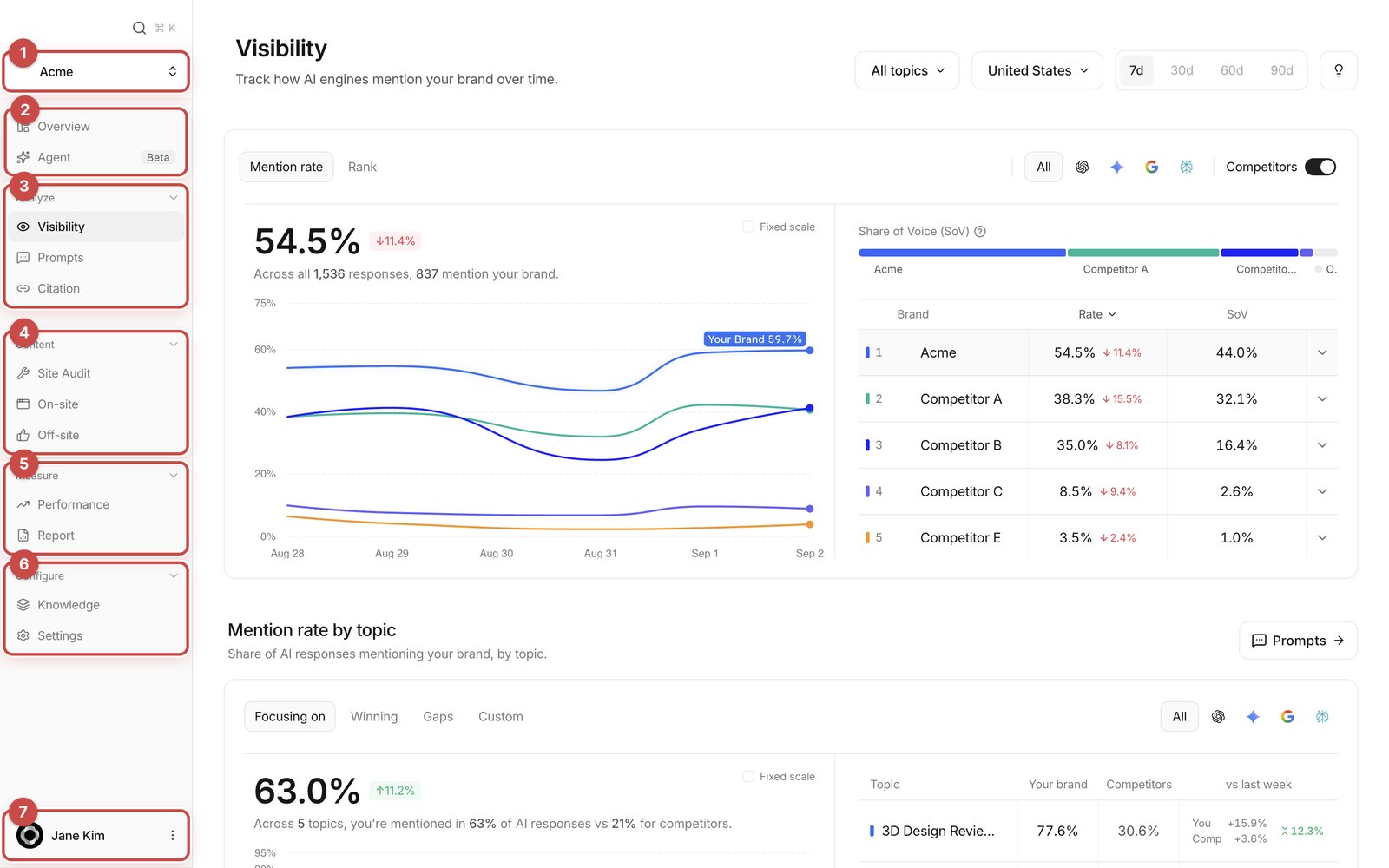 1. **Workspace switcher** — the brand you are looking at. Switch here if you run more than one.
2. **Overview** and **Agent** — the week at a glance, and a chat you can ask about your own data.
3. **Analyze** — Visibility, Prompts, Citation: where measurement lives.
4. **Content** — Site Audit, On-site, Off-site: where content is written and reviewed.
5. **Measure** — Performance, Report: what happened after you published.
6. **Configure** — Knowledge, Settings: what gets written next.
7. **Account row** — your account, team members, log out.
The workspace opens on laptops and desktops only. On a narrow screen you get a "please continue on a laptop or desktop computer" message instead.
## Start here
A checklist from signing in to publishing your first draft.
Every sidebar item, what it's for, in one table.
How to read mention rate, share of voice and mention rank.
Review and publish pages for your own domain.
Edit Brand.md and Content.md to change everything written after.
The questions we get most about numbers, drafts, publishing and connections.
## New to GEO?
Understanding what AI engines cite, and how that differs from classic SEO, makes every number in the dashboard easier to read.
How brands get found in AI search.
The engines we measure and how each one behaves.
1. **Workspace switcher** — the brand you are looking at. Switch here if you run more than one.
2. **Overview** and **Agent** — the week at a glance, and a chat you can ask about your own data.
3. **Analyze** — Visibility, Prompts, Citation: where measurement lives.
4. **Content** — Site Audit, On-site, Off-site: where content is written and reviewed.
5. **Measure** — Performance, Report: what happened after you published.
6. **Configure** — Knowledge, Settings: what gets written next.
7. **Account row** — your account, team members, log out.
The workspace opens on laptops and desktops only. On a narrow screen you get a "please continue on a laptop or desktop computer" message instead.
## Start here
A checklist from signing in to publishing your first draft.
Every sidebar item, what it's for, in one table.
How to read mention rate, share of voice and mention rank.
Review and publish pages for your own domain.
Edit Brand.md and Content.md to change everything written after.
The questions we get most about numbers, drafts, publishing and connections.
## New to GEO?
Understanding what AI engines cite, and how that differs from classic SEO, makes every number in the dashboard easier to read.
How brands get found in AI search.
The engines we measure and how each one behaves.